
Skip to content
VercelLogotypeVercelLogotype
LoginSign Up

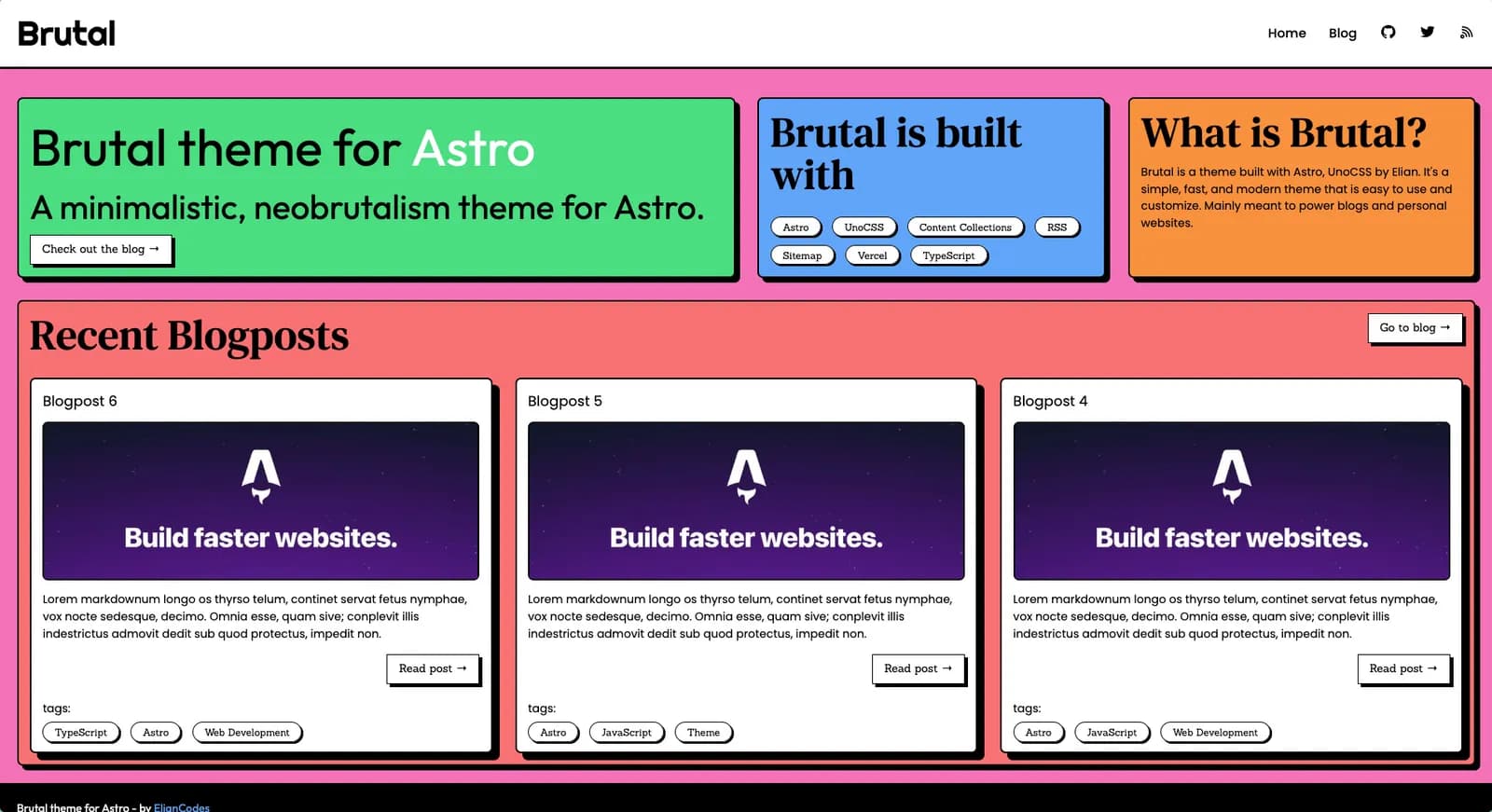
Brutal

Brutal is based on Neobrutalist Web Design, a movement that aims to create websites with a minimalistic and functional design.

DeployView Demo

Brutal - The neobrutalist Astro theme

Brutal is a minimal neobrutalist theme for Astro. It's based on Neobrutalist Web Design, a movement that aims to create websites with a minimalistic and functional design. It has some integrations like Image Optimization, RSS, Sitemap, ready to get your SEO done right.

The theme has no JavaScript integration out of the box, but can always be added of course.

This template is based on my own personal website, with some more generic things added.

Usage

You can bootstrap a new Astro project using Brutal with the following command:

# npm
npm create astro@latest -- --template eliancodes/brutal
# pnpm
pnpm create astro@latest --template eliancodes/brutal
# yarn
yarn create astro --template eliancodes/brutal

Commands

All commands are run from the root of the project, from a terminal:

(Here I use PNPM, no problem if you use NPM or Yarn)

CommandAction
pnpm installInstalls dependencies
pnpm devStarts local dev server at localhost:4321
pnpm lintRuns Biome lint checks
pnpm formatFormats the project with Biome
pnpm checkRuns Astro checks plus biome check
pnpm buildBuild your production site to ./dist/
pnpm previewPreview your build locally, before deploying
pnpm astro ...Run CLI commands like astro add, astro preview
pnpm astro --helpGet help using the Astro CLI

Tooling

This project uses Biome for formatting, linting, and import organization. Astro-specific diagnostics still run through astro check, so CI and local validation use both:

pnpm run check

Integrations

Tailwind CSS

In this theme, I'm using Tailwind CSS to generate the utility classes. The project uses Astro's Tailwind setup with the Vite plugin, plus a small amount of regular CSS for the theme-specific scrollbar and shadow styling.

Sitemap

To generate the sitemap, you don't need to do anything. It's automatically generated when you build your site. You'll just need to switch out the site on astro.config.ts to your own.

import { defineConfig } from 'astro/config';
export default defineConfig({
site: 'https://example.com',
});

RSS

The RSS feed is automatically generated from the Markdown files in the src/content/blog folder. You can ofcourse completely change this to your own needs.

The RSS will output to https://example.com/feed.xml by default. You can change this, by renaming src/pages/feed.xml.js.

Image

Components

components/blog/

This directory contains all components for the blog.

components/errors/

This directory contains all error components.

components/errors/404.astro

This component is used when a page is not found.

components/generic/

This directory contains all generic components, reused over multiple pages.

components/home/

This directory contains all components for the home page.

components/layout/

This directory contains all layout components. For instance, the header and footer and <head> section.

If you need more from this theme, don't hesitate to open an issue or reach out to me!
GitHub
Ownereliancodes
Repositorybrutal
Use Cases
Starter
Stack
Astro
CSS

Related Templates

Astro Boilerplate

An Astro site, using the basics starter kit.
Astro Boilerplate thumbnail

AstroWind

Free, customizable and production-ready template for Astro using Tailwind CSS.
AstroWind thumbnail

Agent Stack

  • AI SDK
  • AI Gateway
  • Sandbox
  • Workflows
  • eveNew
  • ConnectNew

Core Platform

  • CI/CD
  • Content Delivery
  • Fluid Compute
  • Observability

Security

  • Platform Security
  • WAF
  • Bot Management
  • Bot ID

Tools

  • Vercel DropNew
  • Vercel Agent
  • Vercel PluginNew
  • Agent Skills
  • Next.js
  • Domains
  • v0

Frameworks

  • eveNew
  • Nuxt
  • SvelteKit
  • Nitro
  • Turborepo
  • Tanstack Start
  • FastAPI
  • xmcp
  • All frameworks

SDKs

  • Vercel SDK
  • Workflow SDKNew
  • Flags SDK
  • Chat SDKNew
  • Queues SDKNew
  • Streamdown

Build

  • AI Apps
  • Web Apps
  • Marketing Sites
  • Platforms
  • Commerce
  • Platform Engineers
  • Design Engineers

Learn

  • Docs
  • Blog
  • Changelog
  • Knowledge Base
  • Academy
  • Articles
  • Community

Explore

  • Customers
  • Marketplace
  • Templates
  • Partner Finder
  • Vercel + AWS

Company

  • About
  • Careers
  • Press
  • Events
  • Startups
  • Shipped on Vercel
  • Open Source Program
  • Enterprise
  • Pricing
  • Help

Legal & Trust

  • Privacy Policy
  • Terms of Service
  • Cookie Policy
  • DPA
  • Acceptable Use Policy
  • Legal (all documents)
  • Trust Center
  • Status

Social

  • GitHub
  • X
  • LinkedIn
  • YouTube
  • Instagram
  • VercelVercel
Agent Stack
  • AI SDK
  • AI Gateway
  • Sandbox
  • Workflows
  • Eve
Core Platform
  • Security
  • Content Delivery
  • Fluid Compute
  • Observability
  • CI/CD
Tools
  • Next.js
  • Vercel Agent
  • Vercel Plugin
  • Domains
  • v0
Learn
  • Docs
  • About
  • Blog
  • Changelog
  • Knowledge Base
Build
  • AI Apps
  • Web Apps
  • Marketing Sites
  • Platforms
  • Commerce
Explore
  • Customers
  • Marketplace
  • Partner Finder
  • AWS
  • Community
EnterprisePricing
Contact
Log InSign Up
Dashboard

Products

Agent Stack

  • AI SDK
  • AI Gateway
  • Sandbox
  • Workflows
  • Eve

Core Platform

  • Security
  • Content Delivery
  • Fluid Compute
  • Observability
  • CI/CD

Tools

  • Next.js
  • Vercel Agent
  • Vercel Plugin
  • Domains
  • v0
Resources

Learn

  • Docs
  • About
  • Blog
  • Changelog
  • Knowledge Base

Build

  • AI Apps
  • Web Apps
  • Marketing Sites
  • Platforms
  • Commerce

Explore

  • Customers
  • Marketplace
  • Partner Finder
  • AWS
  • Community
Enterprise
Pricing
Sign UpLog In
Contact
DeployView Demo

Loading status…

Select a display theme: