
Framework-defined infrastructure at Vercel brings previously Next.js-only features to SvelteKit.
Svelte has made a name for itself in the world of web development frameworks, thanks to its unique approach of converting components into optimized JavaScript modules. This innovative way of rendering apps eliminates the overhead found in traditional frameworks, leading to more performant and efficient applications.
With the release of SvelteKit 1.0, developers can leverage the power of fullstack Svelte without worrying about breaking changes. Furthermore, SvelteKit continues to evolve, offering a robust set of features and seamless integration with various deployment environments, including Vercel.
Vercel, using framework-defined infrastructure (FDI), has embraced SvelteKit, recently adding support for per-route configuration for Serverless and Edge Functions, Incremental Static Regeneration (ISR), and easier compatibility with a range of Vercel products. In this article, we'll explore how to make your apps more performant, scalable, and user friendly.
Note: This post is historical. Product names and runtime guidance may have changed. For new projects, use Vercel Functions with the Node.js runtime and Fluid compute. Use Routing Middleware for request-time routing before a response completes.
Link to headingSvelteKit Adapters
First, it helps to know how SvelteKit's adapter system works. SvelteKit apps build to platform-agnostic JavaScript, so we need to use an adapter_ _to deploy it to the platform of our choosing.
SvelteKit's adapters aid FDI by giving information to a deployment environment about what precise needs the project has. This gives an incredible amount of flexibility from one codebase: you can swap out adapters to deploy to any number of platforms.
By default, npm create svelte@latest generates a SvelteKit app which includes adapter-auto. This is suitable for the majority of projects, as its primary function is to determine the specific adapter required for your project and fetch it during the build process.
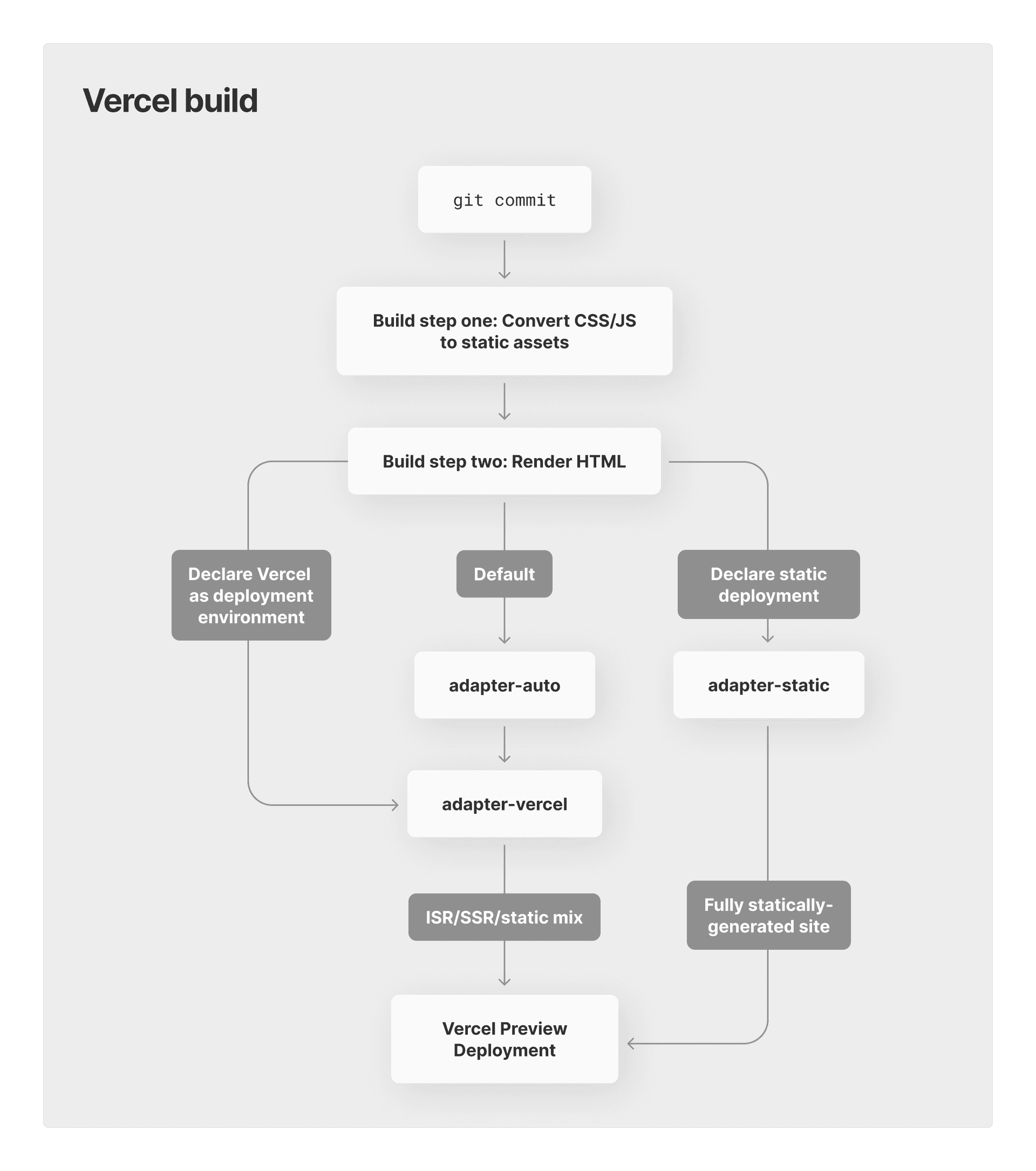
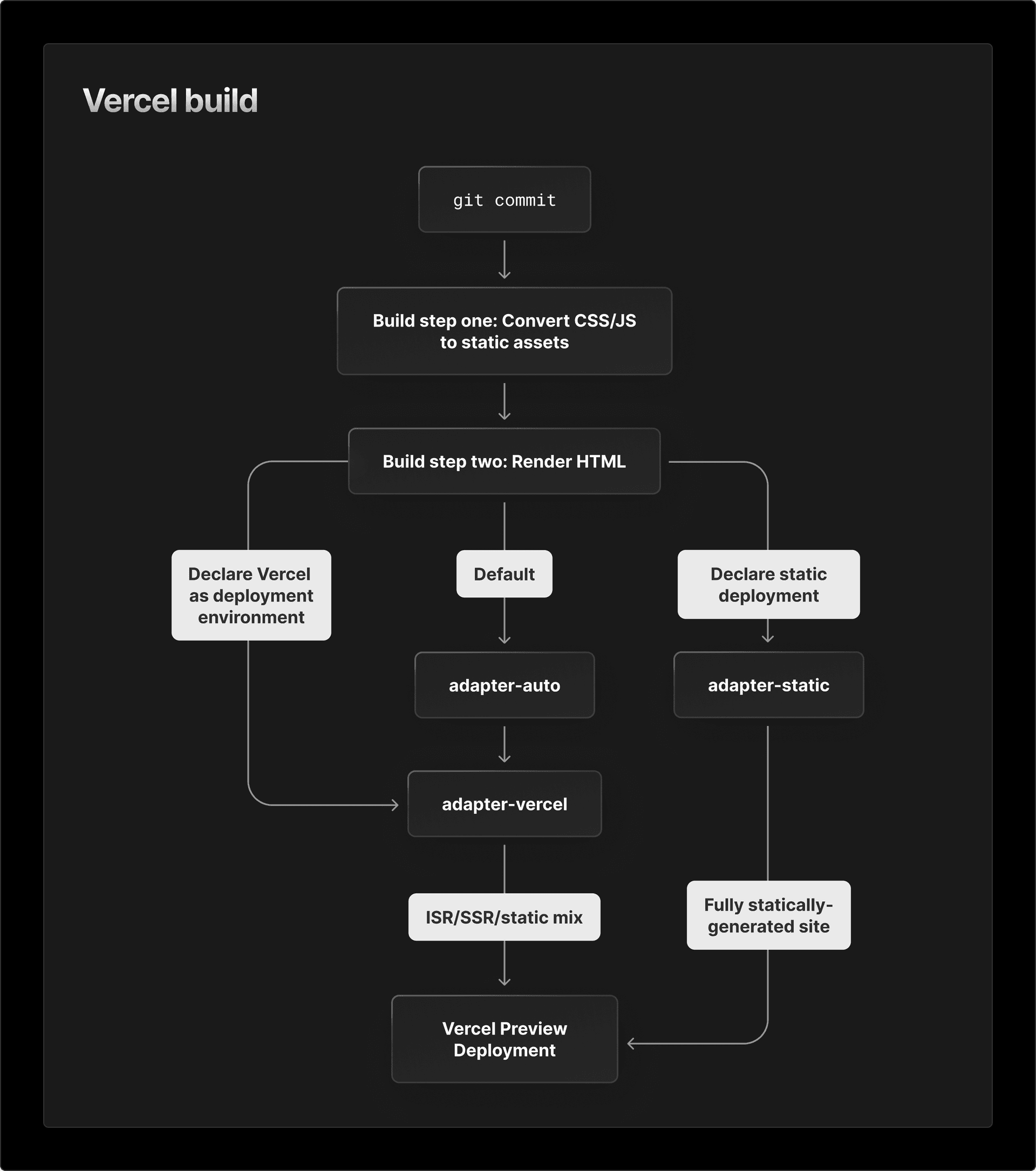
However, if you know your deployment environment ahead of time, it's best to install the appropriate adapter, since this both clarifies your package.json and slightly improves build times.
In addition to adapter-auto, the Svelte team have built adapters for:
Vercel
Cloudflare and**_ _**Cloudflare Workers
Node
Static site generation
The community has also built numerous adapters for other deployments, such as a standalone Deno or Bun server, an Electron desktop app, a browser extension, and even a "multi-adapter" that allows your application to automatically build to multiple deployments. For a full listing of adapters, check out the official Svelte Society listing.
Link to headingPer-route data fetching and rendering
Now that we've covered how adapters work, it’s time to zoom in on some of the benefits your SvelteKit application gains when deploying to Vercel.
Any route in your SvelteKit app (+page.svelte) can access data returned by a load function colocated in the same directory in a +page.js or +page.server.js file. The load function has access to dynamic parameters, such as URL, and can send them to any server- or client-side request, including HTML-native fetches.
The load function can run on the client or the server, depending on if it's coming from a +page.js or +page.server.js, but your page will not render until data has been acquired. This is useful to avoid layout shift and other issues that come from loading data after page render. You can also fetch data at the Layout level, providing data for all child routes. For times you need to fetch on the client side after the component renders, you can do so within SvelteKit's onMount().
While there's always been a lot of flexibility in how to fetch and render data in SvelteKit, it’s now possible to adjust your Vercel-specific settings for each individual route.
You can choose how each route renders data, including SSR, SSG, or Incremental Static Regeneration (ISR).
Link to headingFunction runtime choices
For current SvelteKit projects on Vercel, use Vercel Functions with the Node.js runtime by default. Use Fluid compute for longer-running workloads, efficient concurrency, and streaming. You can still configure route behavior with the Vercel adapter when your app has specific runtime requirements.
Link to headingIncremental Static Regeneration
Incremental Static Regeneration (ISR) is a modern web development strategy that allows developers to create and update static pages on-demand, after the initial build.
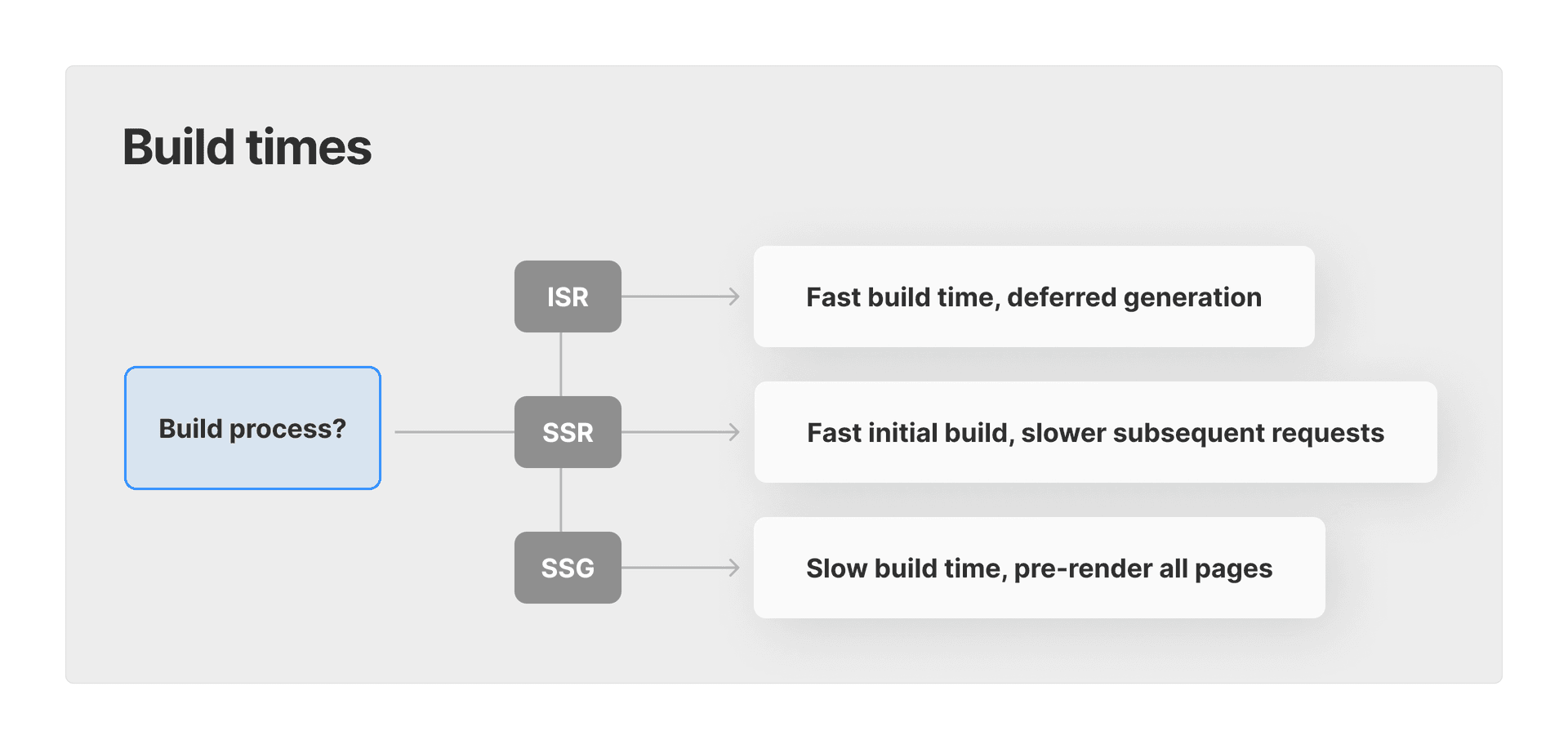
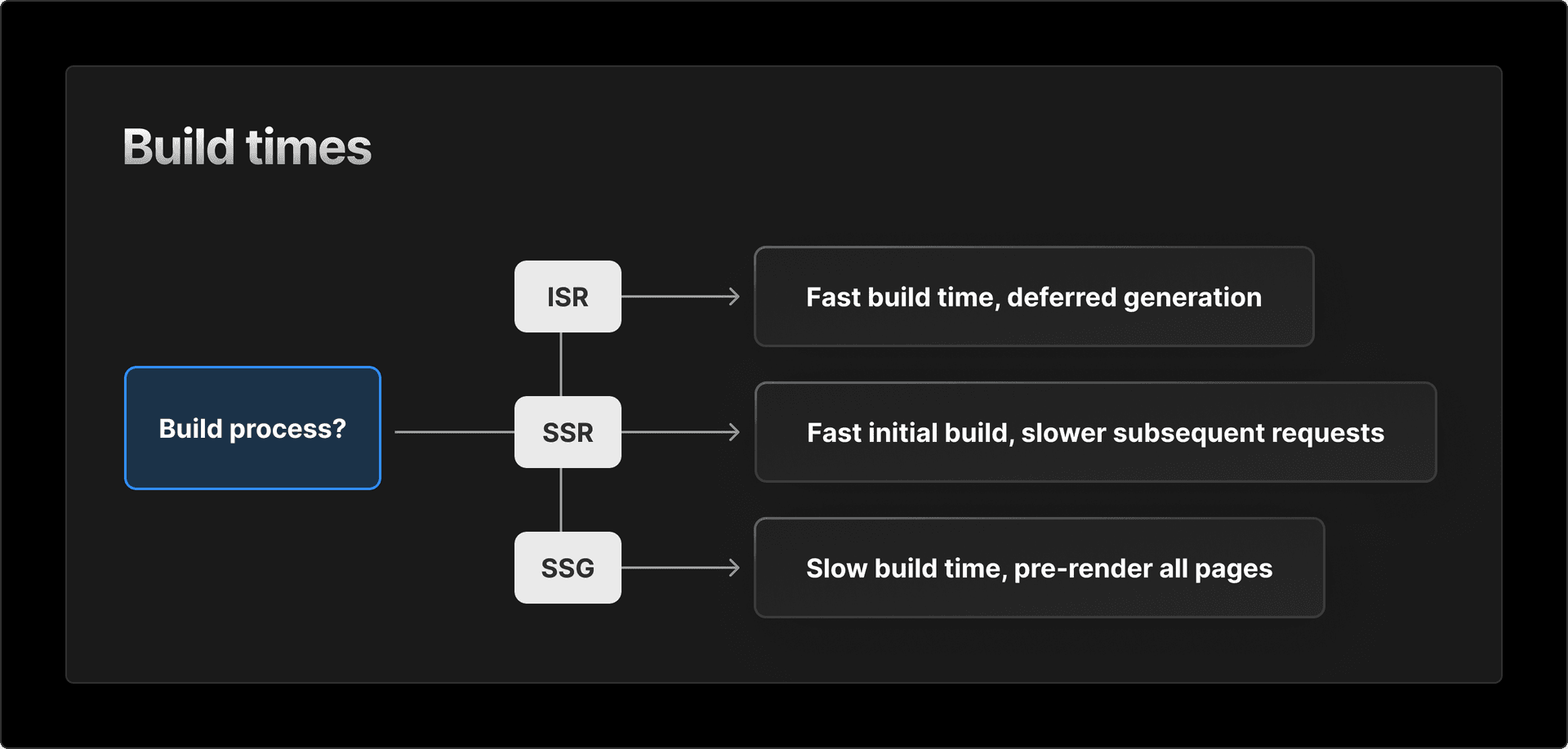
This approach combines the benefits of both static site generation (SSG) and server-side rendering (SSR), offering fast load times for end-users, reduced load on servers, and the ability to update content without a full rebuild. Because of its end-user similarity to SSG, ISR also offers huge gains for ranking in search engines.
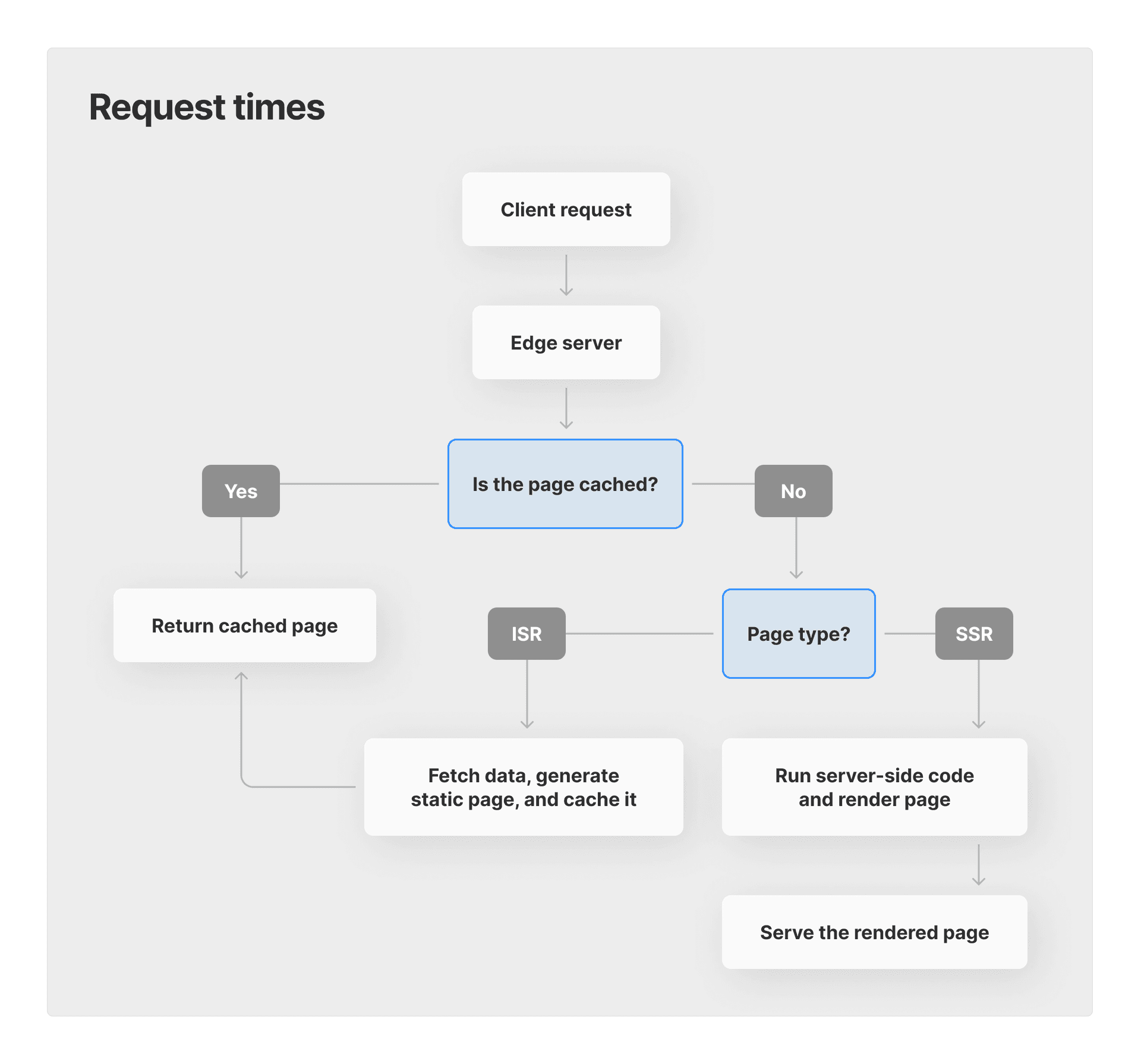
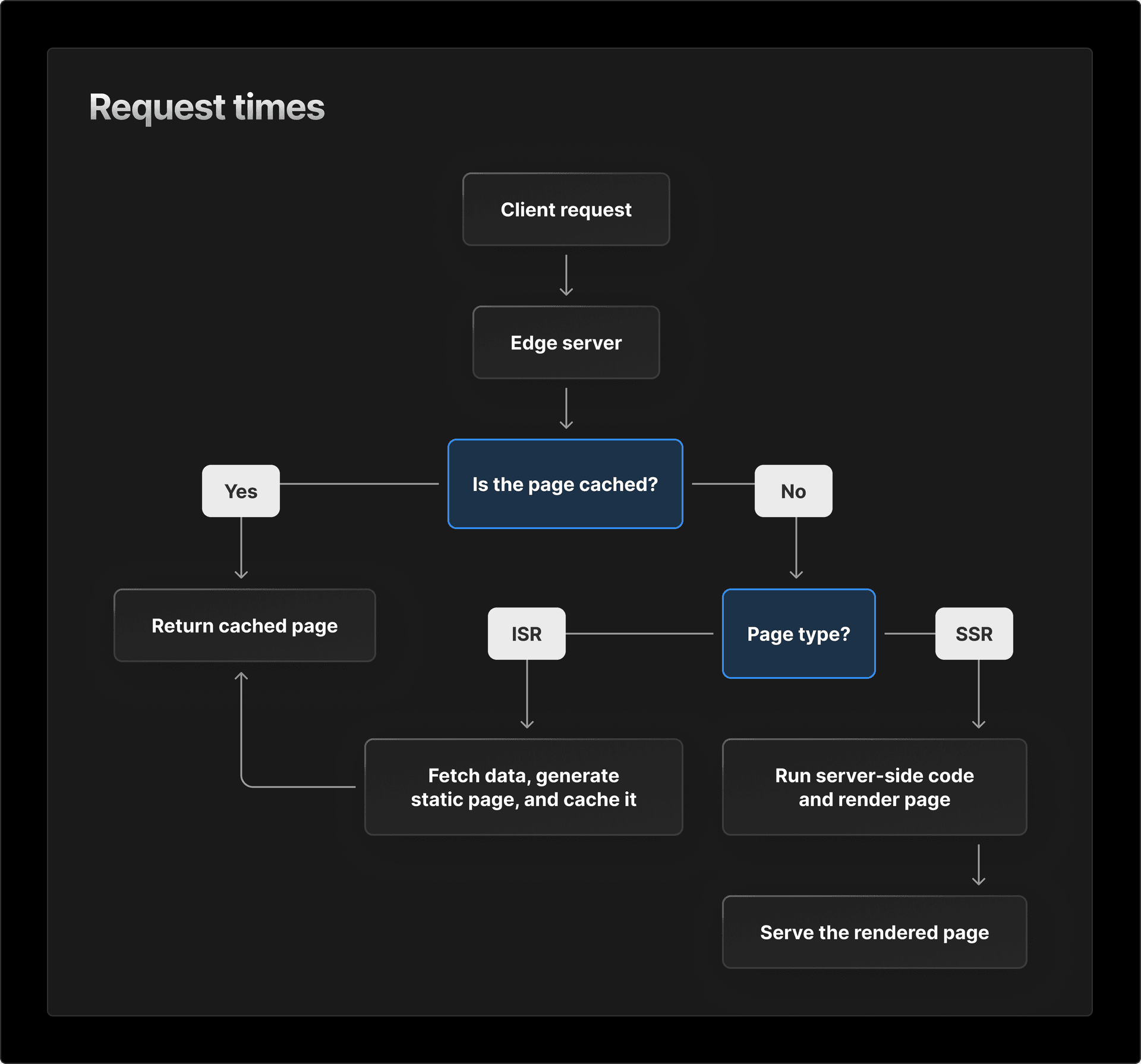
As of early this year, SvelteKit officially supports ISR with Vercel. To configure ISR, you need to include the isr property in your server-side config object (like the Vercel Functions configuration above).
For example, you may have a blog where all the articles are pulled from a CMS:
export const config = { isr: { // Expiration time (in seconds) before the cached asset // will be regenerated by invoking the Serverless Function. // Setting the value to `false` means it will never expire. expiration: 60,};Setting up ISR also occurs within the config object of a `page.server.js` file.
You can also include a bypassToken to programmatically bypass or refresh the ISR cache. Take a look at the docs to learn more about these advanced options.
Link to headingOther Vercel gains
**Data at the edge. **Your app is only as fast as its slowest piece, so earlier this year, we introduced Edge Config, a near-0ms latency data store associated with your Vercel account that enables you to read data at the edge without querying an external database. Now, we're rolling out Vercel KV, Postgres, and Blob to give you a suite of fully-integrated data products at the Edge.
**Preview Deployments. **SvelteKit users on Vercel have always had access to immutable, per-
git commitdeployments that run live on Vercel's Edge Network. We introduced our Figma-like commenting feature last year, and now we're introducing Visual Editing, so you can edit CMS-generated elements of your site directly on the webpage.**Analytics. **Vercel Web Analytics can be integrated in your SvelteKit project with
just three lines of code. This enables you to visualize and monitor your application's traffic over time, and when paired with Speed Insights, gives a clear picture of your app's performance for your users.
Link to headingBringing it all together
Deploying SvelteKit on Vercel means more flexibility, faster data fetching, and better team tools than ever. You have:
Vercel data solutions such as Edge Config and Marketplace storage integrations.
Per-route fetching and rendering configuration for Edge Functions, Vercel Functions, and ISR.
A true-to-production Preview Deployment of your application, with live editing and commenting from your whole team.
Native analytics and reporting to monitor your application's performance.
Many more features, such as Cron Jobs or Routing Middleware, that we haven't touched on in this article.
Plus, Vercel offers native integrations with a host of popular tools so you can compose your team's ideal workflow.
We'll be continuing to develop SvelteKit on Vercel with new and better features, so be sure to check back soon.
Figuring out if SvelteKit works for you?
Reach out to us with your team's unique needs.
Contact Us